

Why “Real Humans vs AI Autopilots” Is The Real Question
Over the last few years, ADHD‑friendly apps have exploded: visual planners, AI schedulers, focus music, micro‑task breakdown tools, habit trackers with smart reminders. Great news… except many ADHD’ers report a familiar pattern: new app, honeymoon phase, then quiet uninstall.
One big reason is psychological, not technological. Behavioral research on Gen Z (18–27) shows they’re happy to use AI for low‑stakes tasks, but when it comes to motivation, guilt, reciprocity and “I don’t want to let someone down”, real people beat bots by a wide margin. Humans are far more effective at triggering commitment and follow‑through than a notification, no matter how “smart” it is.
So in this guide we’ll look at the 10 best apps for ADHD in 2026 and, for each one, ask a simple question: “Where does this shine… and where would human accountability still do a better job?”
1. Focido – Social To‑Do With Real Human Motivators
Focido is a social to‑do app built around one core idea: you’re more likely to do things when real people are watching, cheering you on, and quietly judging you (in a good way) if you disappear. Instead of yet another solo checklist, you assign tasks and progress updates into a lightweight accountability loop with human “motivators” who nudge you, react, and celebrate completions.
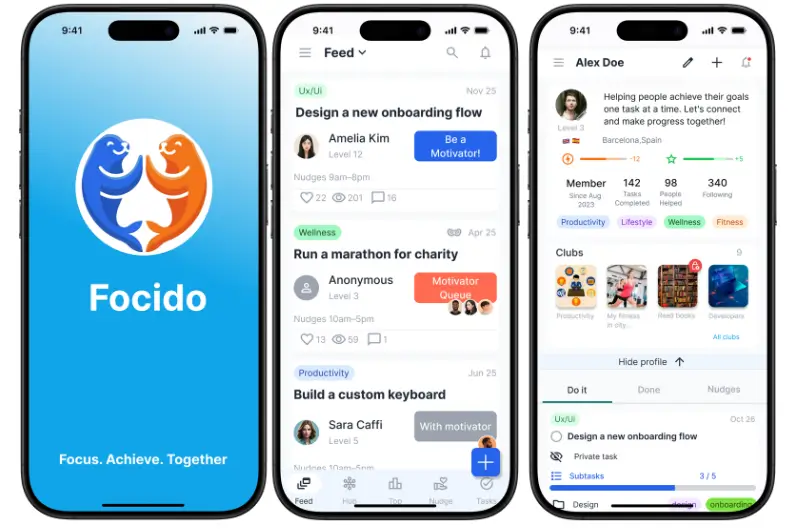
Under the hood there’s a game layer (XP, Credits, Boosts) and a Strava‑style “for doers” vibe: people who care about getting things done, not just logging them. The product spec is explicitly designed around higher completion rates and better day‑7 / day‑30 retention than traditional to‑do apps, by combining micro‑nudges with real social pressure and reward.
👍 Pros
- Human‑first by design. The value proposition is literally “the to‑do app that gets you to act – with real people who believe in you”, not “the AI that plans your day for you”.
- Social accountability, not just gamification. Unlike pure habit apps, Focido’s core loop is a “ping‑pong” of tasks and motivational responses between doers and motivators, tying your goals to real relationships.
- Built for modern ADHD brains. The concept borrows from things that already work (Strava clubs, Focusmate‑style body‑doubling, coaching) but wraps them into a lightweight, mobile‑first to‑do experience instead of heavyweight coaching programs.
- Designed to beat app‑dropoff. Product metrics, XP economy and “quiet hours” are tuned to reduce spammy notifications while still keeping you in a healthy shame‑free loop of “I told someone I’d do this, so I will”.
- Aligned with Gen Z motivation research. Internal research explicitly shows that when accountability is social and human, completion and retention outperform AI‑only nudges for young adults.
👎 Cons
- Depends on people, not magic. If you want a totally solo, no‑humans‑involved experience, Focido’s whole point (human motivators) can feel like “too much”.
- Social dynamics can be uncomfortable. Some users will need good safety rails, filters and “ghost modes” so that accountability doesn’t tip into anxiety or people‑pleasing.
- Early‑stage product. As a startup, Focido is still pre‑mass‑market; it doesn’t yet have the years of polish or ecosystem size of something like Tiimo or Motion.
Where it beats AI autopilots
If you already know what to do but can’t make yourself do it, “being seen” by humans is often more powerful than any AI schedule. Focido essentially institutionalizes the body‑double / accountability buddy effect inside an app, instead of hoping an algorithmic calendar will guilt you into action.
2. Tiimo – Visual Planner For Time Blindness
Tiimo is a visual planner built from the ground up for ADHD, autism and executive function challenges. Instead of text lists, you get a scrollable, color‑coded timeline with icons, countdown timers and gentle transition alerts that make time feel more concrete.
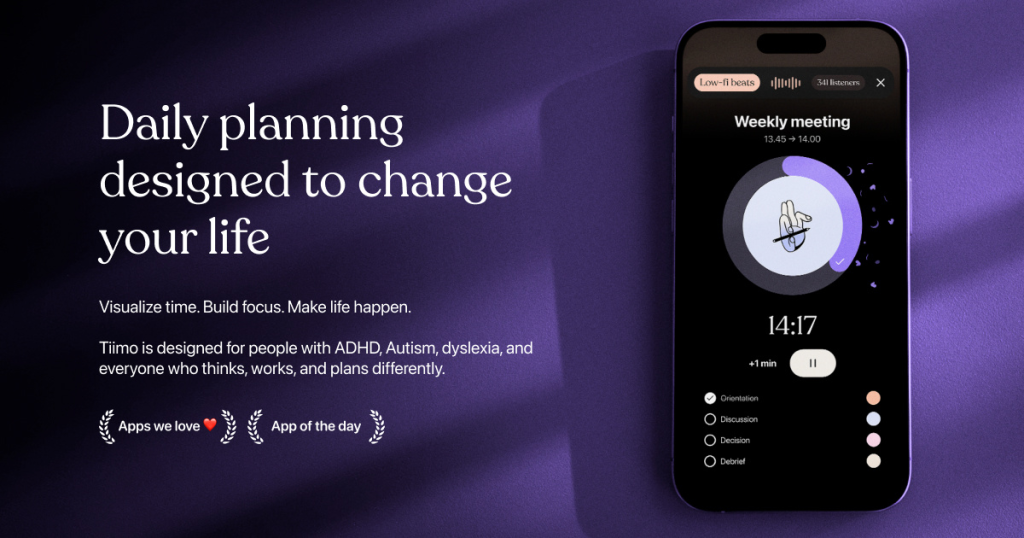
It’s widely recognized in the ADHD community, with over 500k users, Apple Design Award recognition, and features like routine templates, focus timers, Apple Watch integration, and – more recently – an AI co‑planner that helps break tasks into smaller steps.
👍 Pros
- Visual‑first design. Icon‑based blocks, colors and countdowns make “what’s next” and “how long will this take” instantly visible, which is huge for time blindness.
- Gentle transitions, not alarms. Tiimo uses soft “get ready” alerts and countdown‑style nudges instead of harsh, guilt‑heavy notifications that can trigger shame spirals.
- Built‑in focus timers. You can start a focus session from within a task, including on Apple Watch and via iOS Live Activities, reducing app‑switching distractions.
- Neurodivergent‑driven. It was designed specifically for neurodivergent users, informed by lived experience, not retrofitted from a generic productivity app.
👎 Cons
- Limited project depth. It’s fantastic for daily routines and simple tasks, less so for complex projects with dependencies or team collaboration.
- Best features sit behind Pro. Some of the more advanced options (routines, timers, AI assist) require a paid subscription, which can be a barrier.
- Still mostly solo. Even with AI co‑planning, Tiimo doesn’t give you built‑in human accountability; you’re still the only one who cares if you skip the routine.
Human vs AI angle
Tiimo’s AI co‑planner is excellent at turning “clean the apartment” into smaller blocks, but it can’t actually notice your avoidance in real‑time or send you a human “hey, did you manage that?” message. For many ADHD’ers, that human follow‑up is the missing link between beautiful plans and actual behavior.
3. Motion – AI Calendar That Schedules Your Life
Motion (UseMotion) is what happens when you take an executive assistant, feed them all your deadlines and meetings, and then turn them into an app. You dump tasks into Motion, give them durations and deadlines, and its AI autopilot schedules everything into your calendar, dynamically reshuffling when meetings move or tasks slip.
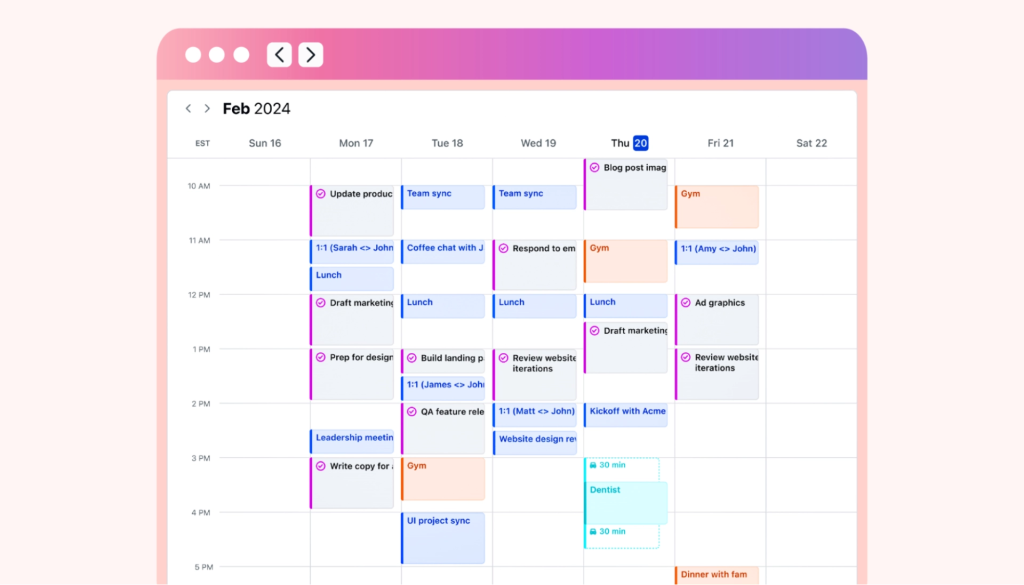
For ADHD, this directly attacks the “when should I do this?” paralysis and classic time‑blindness problem: overbooking 12 hours of work into an 8‑hour day. Motion also protects focus blocks by automatically defending them from new meeting invites.
👍 Pros
- Removes “when” decisions. Motion automatically picks time slots for tasks based on priority and deadlines, which can be a relief if planning itself is exhausting.
- Real‑time rescheduling. When meetings move or you complete tasks early/late, the AI reshuffles your schedule without manual cleanup.
- All‑in‑one workspace. Calendar, tasks, and project management sit in one interface, reducing context switching – something ADHD brains find especially punishing.
- Focus block protection. It can automatically block out deep‑work time and keep it from being overrun by random meetings.
👎 Cons
- Expensive. Motion is one of the pricier tools in this list, with individual plans significantly higher than many ADHD‑friendly planners.
- Steep learning curve. The initial setup and configuration can overwhelm the exact users it’s trying to help, especially if executive function is already fried.
- Risk of overscheduled burnout. Without visual capacity safeguards, Motion can pack your day so tightly that it feels like a perfectionist robot took over your life.
- Still not emotionally intelligent. Motion can move tasks forever; it doesn’t know if you’re stuck because of fear, rejection sensitivity or shame.
Human vs AI angle
Motion is an excellent “brain off” planning autopilot. But if you consistently ignore the schedule – because of anxiety, overwhelm, or RSD – you’ll just end up with a beautifully rearranged calendar of things you still didn’t do. A human checking in (“What happened yesterday? What got in the way?”) is outside Motion’s scope.
4. Goblin.tools – AI Micro‑Task Breakdown For Neurospicy Brains
Goblin.tools is a collection of small AI helpers designed explicitly for neurodivergent people. Its headline feature, Magic ToDo, takes intimidating tasks like “do my taxes” and breaks them into bite‑sized, concrete steps, with a “spiciness” slider that controls how granular the breakdown gets.
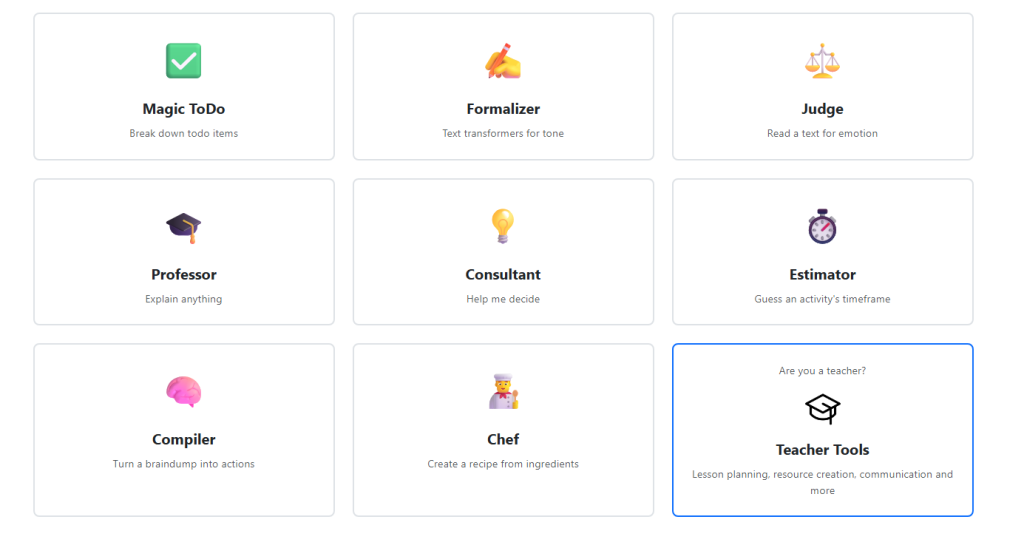
Alongside Magic ToDo, there’s a tone formalizer, mood “judge”, “professor” to explain complex text in simple language, a time estimator, and a compiler that turns brain dumps into actionable task lists. It’s free or very low‑cost and beloved in ADHD / autism communities.
👍 Pros
- Purpose‑built for neurodivergent users. The entire toolkit is openly marketed as “designed for neurospicy challenges” like executive dysfunction and social tone anxiety.
- Exceptional task breakdown. Magic ToDo is one of the best ways to turn a paralyzing blob task into clear, sequenced micro‑actions.
- Helpful utilities beyond tasks. Tone adjustment, time estimation and brain‑dump‑to‑tasks compilation all address real ADHD pain points.
- Low friction, low cost. No complex setup, accounts, or heavy onboarding: you can paste a task and get a breakdown in seconds.
👎 Cons
- Not a full planner. Goblin.tools doesn’t include a calendar, habit system, or deep scheduling – you have to export its outputs somewhere else.
- No built‑in accountability. Once it gives you your beautiful micro‑plan, nobody is watching whether you follow it.
- Easy to “collect plans” without acting. For some ADHD’ers, generating endless broken‑down lists can become its own avoidance strategy.
Human vs AI angle
Goblin.tools is phenomenal for answering “what exactly should I do?” but it’s silent on “how do I make myself care enough to start?” Pairing it with a human motivator (whether in Focido, a coach, or a friend) is what turns its micro‑steps into movement rather than just another clever list.
5. Structured – A Simple Timeline For Your Day
Structured is a minimalist day planner that shows your tasks as blocks on a visual timeline rather than as a flat list. It’s often recommended to ADHD users who want a simple, Apple‑centric way to see “today” without the cognitive clutter of full project management tools.
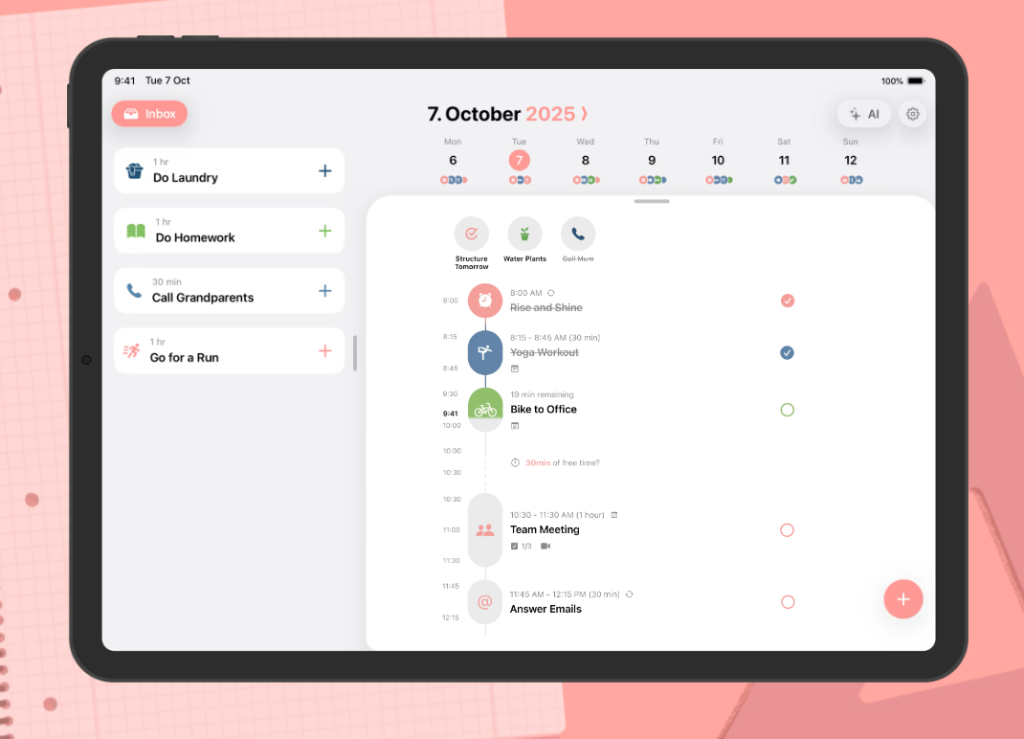
Guides to ADHD‑friendly calendars consistently group Structured with Motion and Tiimo as top picks for “time management” and strong reminders, especially for iOS users who like a clean, vertical view of the day.
👍 Pros
- Visual timeline instead of lists. Seeing each task occupy a chunk of your day helps counter time blindness and “I can do 12 things in one afternoon” illusions.
- Strong reminder system. Reviews frequently highlight its persistent, varied notifications as especially helpful for ADHD time blindness.
- Minimalistic, Apple‑first. The design appeals to users who find heavier planners overwhelming; it plays nicely with native Apple calendars.
👎 Cons
- Limited automation. Structured doesn’t (yet) offer full AI scheduling like Motion, so you’re still manually deciding where tasks go.
- No deep habit or project features. It’s ideal for daily planning, less so for complex multi‑step goals or habit systems.
- No social layer. As with most planners, Structured assumes you’ll hold yourself accountable once tasks are on the timeline.
Human vs AI angle
Structured is a great canvas, but it won’t tell you which tasks belong there or check in if you ghost your own plans. For many ADHD users, that’s exactly where another human – or a human‑powered tool like Focido – makes the difference between a nice timeline and a lived day.
6. Morgen – Smart Organizer That Respects Your Limits
Morgen is an AI‑assisted calendar and task hub known for its “Frames” – reusable time blocks (like “Deep Work 8–11am”) – and for consolidating tasks from tools like Notion, Todoist, Linear or ClickUp into one view. It was designed in part around ADHD challenges like time blindness, overcommitment, and decision fatigue.
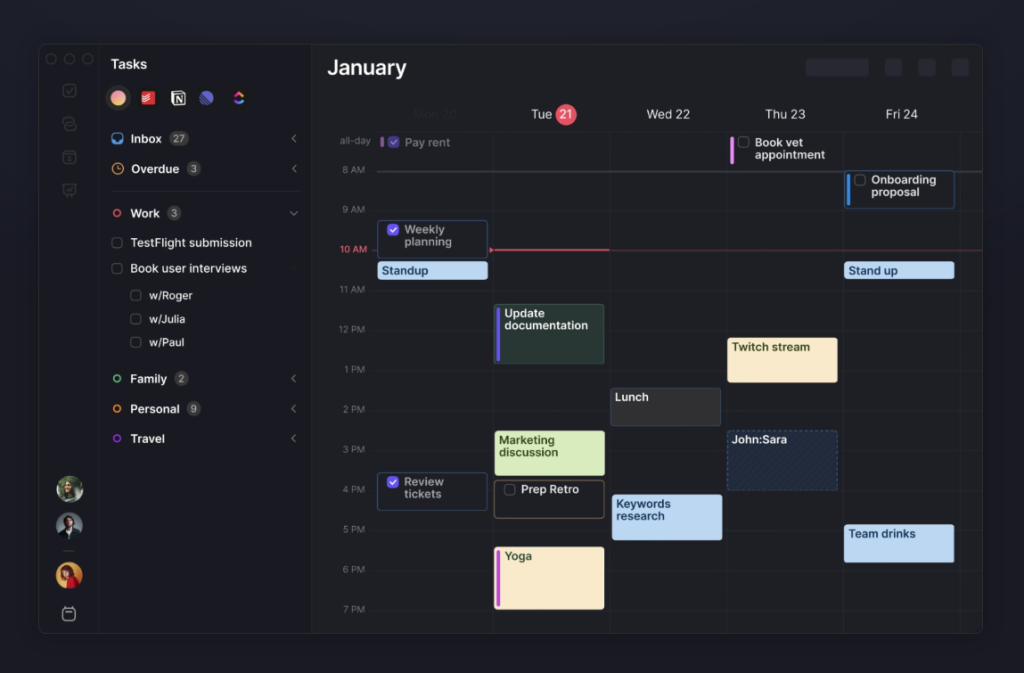
Instead of fully seizing control like Motion, Morgen’s AI acts as a copilot: it suggests where tasks could go based on time, priority and energy, but you retain final say. Its visual frames and conflict alerts help you see capacity so you don’t accept one more meeting “just this once”.
👍 Pros
- Unified view of life. Morgen merges multiple calendars and task lists into a single, ADHD‑friendly overview so you aren’t mentally context‑switching between tools.
- Frame‑based time blocking. You can design recurring structures (deep work, admin, breaks) that make your ideal week visible and limit overbooking.
- AI that suggests, not dictates. The AI planner surfaces “what should I do next?” options without hijacking your calendar autonomy.
- Clear capacity visualization. Color‑coded frames and overlap alerts show when you’re realistically out of time or energy, not just out of pixels.
👎 Cons
- Still needs user engagement. You have to interact with the AI and frames; it’s not a “set and forget” autopilot.
- No built‑in human accountability. Morgen helps you plan better days, but it doesn’t involve people who will notice if you silently drop your tasks.
- Power‑user bias. Users who don’t already live in multiple tools may find its integrations and configurability overkill.
Human vs AI angle
Morgen is one of the more humane AI planners, but it still operates inside your head and your calendar. For sticky ADHD issues like shame, avoidance and self‑sabotage, having to “approve” a suggested plan is very different from knowing a real person will see whether you followed through.
7. Forest – Gamified Focus When Your Phone Won’t Let You Work
Forest is a focus timer app that lets you “plant a tree” when you start a focus session; if you leave the app to check your phone, the tree withers and dies. Stay focused, and you grow a tree – and eventually a whole virtual forest of your past focus sessions.
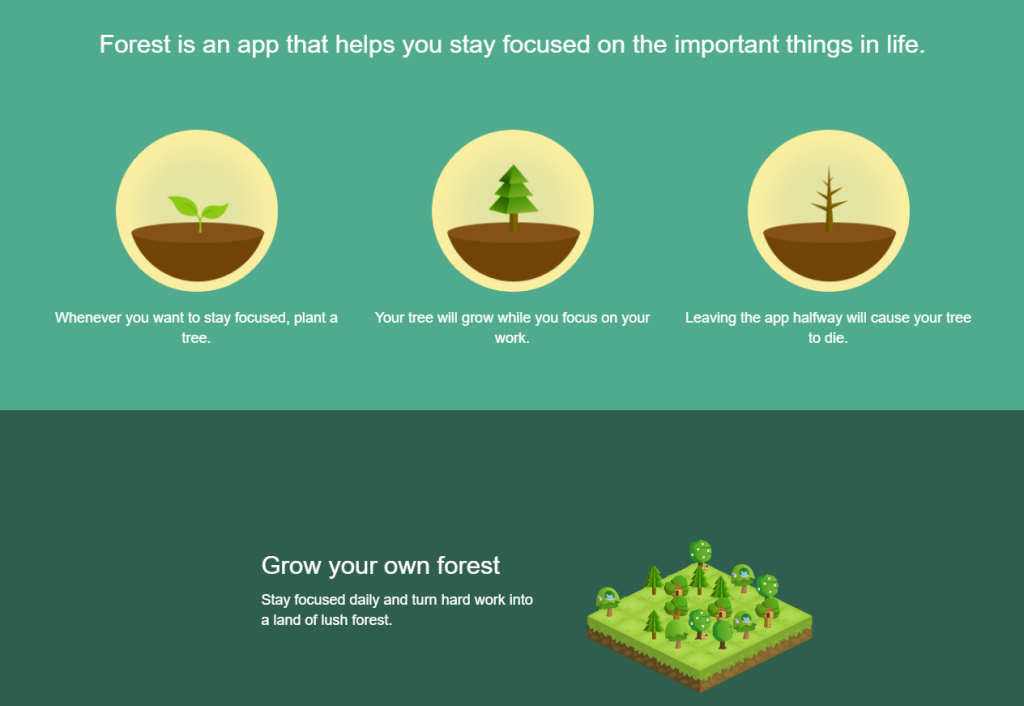
It’s frequently recommended in ADHD communities because it gamifies staying off your phone, offers visual progress, and even lets you contribute to real‑world tree planting via its partnership with Trees for the Future.
👍 Pros
- Simple, effective gamification. Each focus block becomes a tree; your forest becomes a visual diary of times you resisted distraction.
- Reduces phone checks. EEG‑based reviews found that Forest significantly cut phone pickups for some ADHD users during testing.
- Real‑world impact. Virtual coins can fund real trees, adding a layer of meaning that many ADHD’ers find especially motivating.
- Low cost. A one‑time purchase on iOS and freemium model on Android make it accessible.
👎 Cons
- Guilt mechanic can backfire. For users with rejection‑sensitive dysphoria (RSD), killing a tree can trigger disproportionate shame rather than healthy accountability.
- Narrow scope. Forest tackles phone distraction, not task planning, emotional regulation, or complex executive function challenges.
- External but not social accountability. The app “judges” you; people don’t. That can feel punishing without the warmth or understanding of a human.
Human vs AI angle
Forest is a great “training wheels” tool for focus, but if your problem is starting the right task, not just staying off your phone, you’ll still need either a solid planner or another human to decide what goes into that 25‑minute block.
8. Brain.fm – Functional Music Engineered For ADHD Focus
Brain.fm offers “functional music” – audio engineered with specific amplitude modulations that entrain brain activity into focus‑friendly patterns. Recent peer‑reviewed research (including work funded by the U.S. National Science Foundation) has shown that Brain.fm’s heavily modulated music improved sustained attention, and that participants with higher ADHD symptom scores benefited even more than neurotypical participants.
Instead of playlists, Brain.fm generates music with embedded rhythmic patterns in the beta range (roughly 12–20 Hz), designed to promote neural phase‑locking in attentional networks and boost focus‑related brainwaves. The tracks avoid catchy hooks and lyrics to minimize distraction.
👍 Pros
- Science‑backed for ADHD. Studies show large gains in focus‑related brainwave power and sustained attention specifically in participants with ADHD symptoms.
- Designed for cognitive effect. Music is built from scratch with modulation patterns that support attention rather than relying on genre or mood tags.
- Minimizes distraction. No vocals, minimal musical surprises, and continuous playback reduce “song skip” impulses that derail ADHD focus.
- Flexible intensity. Users can select different levels of neural effect, which is useful given how varied ADHD arousal needs are.
👎 Cons
- Audio only. Brain.fm doesn’t plan your day, manage tasks, or provide accountability; it’s one piece of an ADHD stack.
- Subscription cost. Compared to free YouTube or Spotify playlists, paying for focus music can feel like a big ask.
- Not universal magic. Some users experience big gains; others notice modest or no effects – it’s highly individual.
Human vs AI angle
Brain.fm is a perfect example of “AI‑enhanced environment” rather than “AI that manages you”. It can give your brain better conditions for focus, but it doesn’t care whether you tackle hard tasks or scroll Reddit. A human motivator or accountability partner can help you decide what deserves those precious focus blocks.
9. Fhynix – Tasks, Habits And WhatsApp Nudges In One Timeline
Fhynix is an AI‑assisted daily planner that combines a color‑coded calendar, tasks, habits, and routines into a single visual timeline. It leans into ADHD‑friendly features like voice input, natural‑language task entry (“Pay bills tomorrow at 4 pm”), and WhatsApp reminders that feel more “real” than standard push notifications.
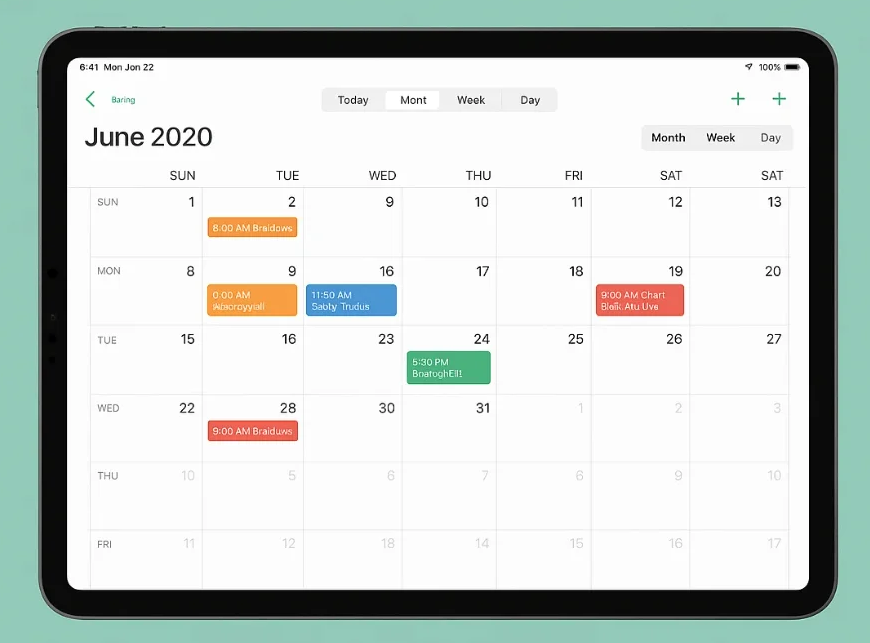
The app’s philosophy is that everything important should show up on the timeline for the day it belongs to – tasks, events, and recurring habits – so nothing lives in a forgotten to‑do list. AI helps with time estimates and scheduling, while WhatsApp alerts offer a second layer of follow‑through.
👍 Pros
- Unified timeline of life. Tasks, habits, routines and events share one visual schedule, which cuts cognitive load for ADHD users.
- Low‑effort input. You can add tasks via speech or simple text (“gym every morning at 7am”), and the system recurs and schedules them.
- WhatsApp reminders. For many users, WhatsApp pings are harder to ignore than in‑app notifications, creating higher accountability without heavy pressure.
- Calendar‑first habit building. Fhynix explicitly focuses on routines that live in time, not just streak counters.
👎 Cons
- AI still lacks emotional context. The planner can estimate and schedule, but it doesn’t know when avoidance, fear, or depression are behind your “not done” list.
- WhatsApp might feel invasive. Some users don’t want their messaging app blended with planning, especially if they’re already notification‑overwhelmed.
- No real human accountability. Reminders feel more “serious”, but ultimately Fhynix is still you vs your future self.
Human vs AI angle
Fhynix gets closer to “human‑like” nudging by using channels you actually check, but the relationship is still with an app, not with someone who knows your patterns, your excuses, and your values. For ADHD motivation, that difference matters a lot more than it looks on paper.
10. How To Actually Use These Apps (And Why Focido Ends Up At The Center)
If you look across these tools, a pattern emerges:
- Tiimo, Structured, Morgen and Fhynix make time visible and concrete.
- Motion and Goblin.tools offload planning and micro‑task breakdown to AI.
- Forest and Brain.fm shape your environment so focus is more likely.
All of them reduce friction. That’s huge – but it’s not the whole story. Internal and external research on Gen Z motivation suggests that when the stakes are real (career, health, meaningful goals), people still trust and respond more strongly to real humans than to AI nudges, especially around guilt, reciprocity and “I don’t want to let someone down”.
That’s why Focido is so interesting in 2026. Instead of trying to be a smarter robot assistant, it leans into the one thing apps usually ignore: other people. It assumes that your ADHD isn’t just a scheduling problem – it’s a motivation, emotion, and accountability problem – and it builds the whole experience around human‑powered follow‑through, with AI playing a supporting role rather than running your life.
If you’re building your own ADHD stack this year, a realistic setup could look like:
- A visual planner (Tiimo / Structured / Morgen / Fhynix) to make time visible.
- One or two AI helpers (Motion / Goblin.tools) to kill decision fatigue.
- Brain.fm or similar audio, plus Forest if phone distraction is a big deal.
- And, sitting in the middle, something like Focido that involves real humans in your goals, so you’re not trying to out‑negotiate your own brain alone at 2am.
AI autopilots can plan a perfect day. Real humans still do a better job of helping you live it.